Okay, let’s move on and get the database update forms and actual table updates coded. I am going to start by getting the forms coded and more or less working (i.e. form data makes it to the form button callback function).
I am also thinking that it would be good if the form was re-displayed after any submission. That is because I expect there may be times when multiple entries for one table or the other will be made on a given day. Will likely require a done button to stop that cycle.
Basic Forms and Test Callbacks
I will repeat the last selected form until told otherwise. Not sure at the moment how to code that situation. So will just start by sorting the form fields and getting them to a callback function. For now will just print the form data to the dashboard for confirmation things are going in the right direction.
Basic Rainfall Form and Callback
Will start with the rainfall table. Pretty straightforward.
... ...
def rf_2db():
  """Add form rainfall data to database"""
  st.header("Add rainfall or snowfall equivalent to database")
  # for dev write to dashboard window
  st.write(f"Date: {st.session_state.rf_dt}")
  st.write(f"Date: {st.session_state.rf_tm}")
  st.write(f"Amount (mm): {st.session_state.rf_mm}")
... ...
# based on session variables set date variables used by code to display data and charts
c_dt = time.strftime("%Y.%m.%d", st.session_state.c_dtm)
... ...
if db_submitted:
  if add_itm == "Add rainfall data":
    st.subheader("Add rainfall data")
    with st.form("add_rf"):
      st.text_input("Date:", value=c_dt, key="rf_dt", placeholder="yyyy.mm.dd")
      st.text_input("Time:", value="08:00", key="rf_tm")
      st.text_input("Rainfall (mm):", key="rf_mm")
      rf_submitted = st.form_submit_button("Add to Database", on_click=rf_2db)

  elif add_itm == "Add temperature/weather data":
   st.subheader("Add temperature/weather data")
else:
And here’s the relevant portion of the dashboard after selecting to update the rainfall table from the sidebar.
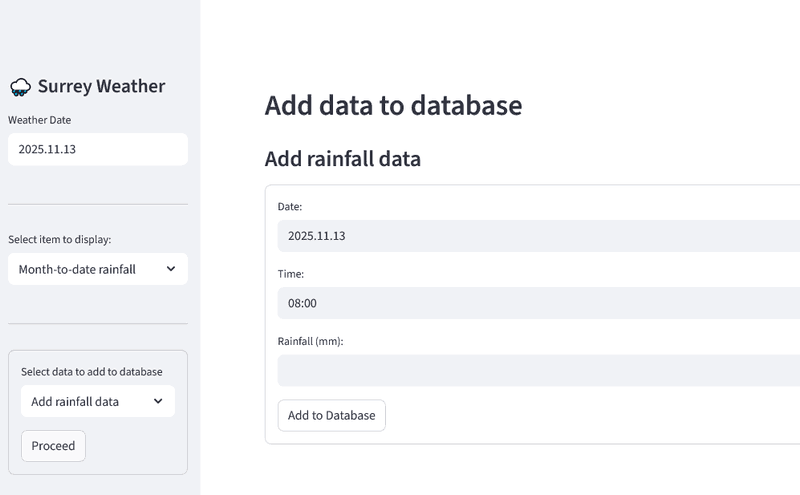
The last date I currently had rainfall data for was 2025.11.07. So I modified the form fields to reflect 15 mm rainfall for 2025.11.10. And after clicking the add button, I got the following displayed in the dashboard.
(Note: because I knew I was going to start work on this feature, I have not been using my utility scripts to update the database for a week or so now.)
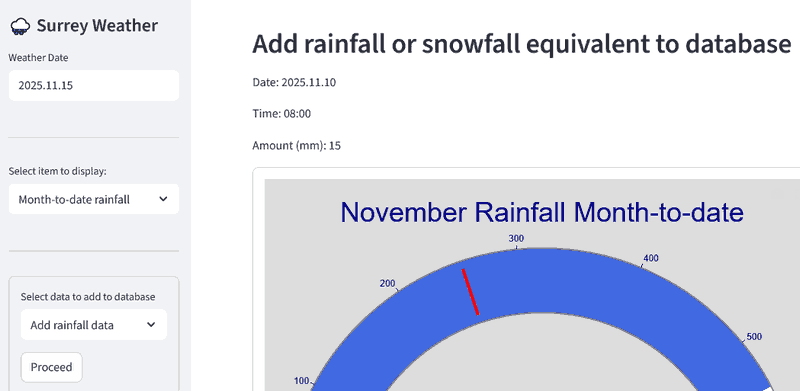
So, that appears to work as intended.
Basic Temperature Form and Callback
Let’s get that working for temperature and weather data. Pretty much a copy, suitably modified, of the code for the rainfall input form.
... ...
def tw_2db():
  """Add form temperature/weather data to database"""
  st.header("Add temperature and/or weather data to database")
  # for dev write to dashboard window
  st.write(f"Date: {st.session_state.tw_dt}")
  st.write(f"Time: {st.session_state.tw_tm}")
  st.write(f"Temperature (°C): {st.session_state.tw_tc}")
  st.write(f"Humidity: {st.session_state.tw_hu}")
  st.write(f"Condition: {st.session_state.tw_wc}")
... ...
  elif add_itm == "Add temperature/weather data":
    st.subheader("Add temperature/weather data")
    with st.form("add_tw"):
      st.text_input("Date:", value=c_dt, key="tw_dt", placeholder="yyyy.mm.dd")
      st.text_input("Time:", value="08:00", key="tw_tm")
      st.text_input("Temperature (°C):", key="tw_tc")
      st.text_input("Humidity:", key="tw_hu")
      st.text_input("Weather Condition:", key="tw_wc", placeholder="clear, cloudy, rain, etc.")
      tw_submitted = st.form_submit_button("Add to Database", on_click=tw_2db)
And here’s the relevant portion of the dashboard after selecting to update the temperature table from the sidebar and adding some test data. The last temperature entry in the database is currently for 2025.11.08. So I have used data for the morning of the 9th as a test.
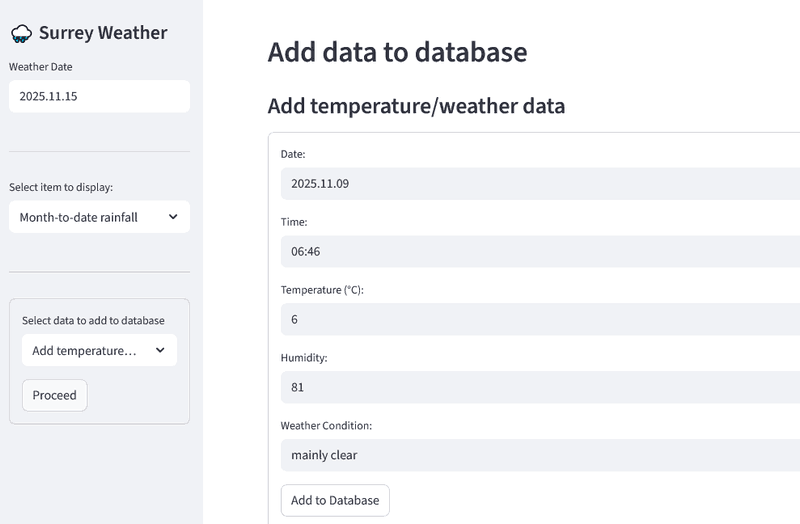
After clicking the add button, I got the following displayed in the dashboard.
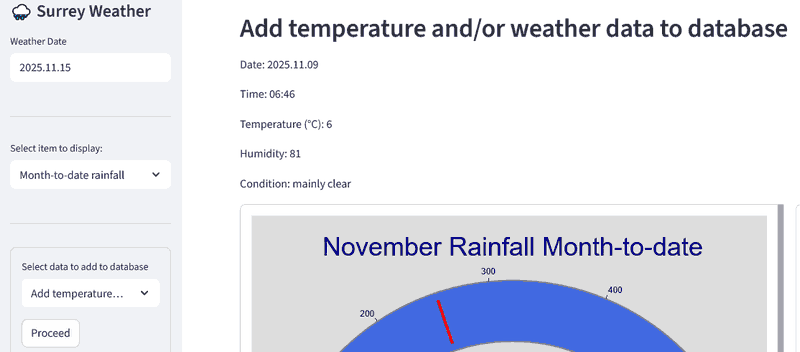
Once again, things look to be going as planned.
Refactor Callbacks to Update Database
Okay, let’s move on and actually update the appropriate database table in each callback.
New Weather_db Class Method
I started by adding a new method to the Weather_db class, allow_zero_rf(). This method determines wether or not an entry with zero rainfall is allowed. Basically, only if there is zero rainfall for the month and the entry is for the last day of the month at 24:00. Copied from my utility script.
... ...
  def allow_zero_rf(self, dt, tm, mtd):
    """Check if a zero rainfall entry is ok. Must be last day of month at 24:00,
      and there must be zero cummulative rainfall for the month.

      Params:
        dt: entry date, yyyy.mm.dd (str)
        tm: entry time, hh:mm (str)
        mtd: month to date rainfall (float)

      Returns: boolean
    """
    rf_dt = datetime.strptime(f"{dt}", "%Y.%m.%d")
    mon_last = calendar.monthrange(rf_dt.year, rf_dt.month)[1]
    is_last = mon_last == rf_dt.day
    is_ok = is_last and (tm == "24:00") and (mtd == 0.0)
    return is_ok
... ...
Update Rainfall Table
The actual update is fairly straight forward. Though I likely should do some data checks before doing so. But, it is just me using this dashboard, so…
def rf_2db():
  """Add form rainfall data to database"""
  # get current monthly total rainfall
  mtd = wdb.get_mon_todt(st.session_state.rf_dt[:7])
  # check for zero rainfall and test if okay to post to db
  if st.session_state.rf_mm == 0.0:
    zero_ok = wdb.allow_zero_rf(st.session_state.rf_dt, st.session_state.rf_tm, st.session_state.rf_mm)
  # if go to go, add data to rainfall table
  if st.session_state.rf_mm or zero_ok:
    dttm = f"{st.session_state.rf_dt} {st.session_state.rf_tm}"
    rf_mn = mtd + float(st.session_state.rf_mm)
    n_rws = wdb.add_rainfall((dttm, float(st.session_state.rf_mm), rf_mn))
I then used the dashboard form to add 4 days worth of rainfall to the database. The results match those in my daily note file.
Though, while working on this I realized there was another update that would at some point be required. I.E. updating the historical monthly rainfall table. My utility script has a command line parameter for that purpose. If present the table is updated, otherwise not. Not sure whether to add another form field, or another selection in the database update form in the sidebar. But will leave that for later.
Another Weather_db Method Needed
In my utility script for updating the temperature/weather table, I generate the SQL to do so in the script. For the dashboard, I believe that should be done by a Weather_db class method. So, let’s code something. Will test when I get the form callback coded.
I am allowing the possibility of multiple rows of input data. Just so it matches the rainfall table update method. But, don’t really expect it will be used that way.
... ...
  def add_temp_wthr(self, tw_data):
    """Add temperature/weather data to temperature table

    params:
      rf_data: a tuple or a list of tuples of data to add to table
        each tuple: (datetime, temperature, daily low, daily high, weather condition, humidity)

    returns: count of rows added to the table
    """
    if not tw_data:
      return 0

    c_tnm = self.tnms["tp_tnm"]
    # is tuple or array of tuples, just in case
    do_many = not isinstance(tw_data, tuple)
    p_rws = self.get_tbl_rw_cnt(c_tnm)

    in_tmpr_tbl = f"""INSERT INTO {c_tnm} VALUES (NULL, ?, ?, ?, ?, ?, ?);"""
    self.qry_nsrt(in_tmpr_tbl, tw_data, do_many)

    c_rws = self.get_tbl_rw_cnt(c_tnm)
    return (c_rws - p_rws)
... ...
Refactor Temperature Form Callback
Okay, again mostly based on the code in my temperature update utility script. With the switch to using the new Weather_db method. I also had to make sure I was supplying the correct type of value for each database column.
def tw_2db():
  """Add form temperature/weather data to database"""
  tw_t, tw_l, tw_h, tw_u, tw_w = 0.0, None, None, None, ""
  tw_dttm = f"{st.session_state.tw_dt} {st.session_state.tw_tm}"
  tw_t = float(st.session_state.tw_tc)
  if st.session_state.tw_hu:
    tw_u = float(st.session_state.tw_hu)
  else:
    tw_u = None
  tw_w = st.session_state.tw_wc
  tw_data = (tw_dttm, tw_t, tw_l, tw_h, tw_w, tw_u)
  n_rws = wdb.add_temp_wthr(tw_data)
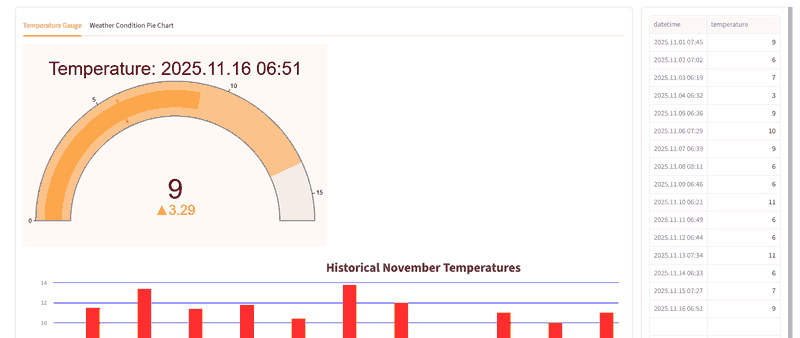
I then entered the temperature and weather data for 2025.11.08 afternoon to 2025.11.16 morning (I am working on the draft post on the latter date). As I was doing so, I was displaying the temperature screen in the dashboard. And, I was specifying the display date in the sidebar, so that I could see the addition to the database take place. It all appeared to work perfectly well.
Here’s a the pertinent part of the dashboard after the last data was entered.
Updating Historical Monthly Average Rainfall
As mentioned above, this is something I forgot about until I was reviewing the code to update the rainfall table in my utility script. I was thinking of adding a field to the rainfall form. But, I think I will just add a selection to the database update form in the sidebar. The selection will simply execute the class method which updates the history table. No form or acknowledgement will be displayed.
But, I did need to execute an st.rerun() so that the dashboard would show the currently selected data display.
... ...
  with st.form("add_db", clear_on_submit=True):
    add_items = ["Add rainfall data", "Add temperature/weather data", "Update monthly rainfall history table"]
    add_itm = st.selectbox("Update database tables", add_items, index=1)
    db_submitted = st.form_submit_button("Proceed")

if db_submitted:
  st.header("Update database")
else:
... ...
      tw_submitted = st.form_submit_button("Add to Database", on_click=tw_2db)
  elif add_itm == "Update monthly rainfall history table":
    wdb.updt_hist_tbl()
    st.rerun()
... ...
I can’t yet test whether or not the table is actually updated as I don’t have a new month’s worth of data. Will do so at the end of this month (November 2025).
Wee Bug?!
I was also having an issue with the pie chart for historical weather conditions. ‘partly cloudy’ did not fit in its slice of the pie. So was being displayed outside the pie chart. This caused it to be mostly outside the column container. Setting use_container_width=True seems to have fixed that for now. Hopefully permanently.
Done M’thinks
In my opinion, that’s it for this post. Goodly amount of progress with the dashboard. No idea where to go next. If anywhere. Dashboard project may in fact be as done as this post. But, I will think on that for a day or two before drawing any conclusion.
Hope your projects are also progressing nicely and perhaps reaching a Version 1.0 release.